
18 KiB
School Management API Documentation
The School Management API Documentation, defining all functions and their purpose. As well as how to use the API, how to properly call functions and provide the necessary fields.
Contents
- Getting Started
- General Functions
- Creating Accounts
- Log into Accounts
- Get Account
- Updating Account information
- Managing Contacts - (Not Documented)
- Create Contact - (Not Documented)
- Update Contact Name - (Not Documented)
- Update Contact Address - (Not Documented)
- Update Contact Home Phone - (Not Documented)
- Update Contact Work Phone - (Not Documented)
- Update Contact Email - (Not Documented)
- Update Contact Priority - (Not Documented)
- Delete Contact - (Not Documented)
Getting Started
-
Installation & Deployment
The API is an all in one package and is simple and easy to deploy. Eliminating any long unforgiving configurations you may face in other software.
-
Clone the repo
$ git clone https://github.com/SowinskiBraeden/school-management-api $ cd school-management-api -
Rename
.env.exampleto.env -
Enter desired values into
.envmongoURI='your mongo URI' dbo='school' secret='your 256 bit secret' # Suggested port for Production: 80 # Suggested port for Development: 8000 PORT='desired port' # This is to enable the system to send emails SYSTEM_EMAIL='your system email' SYSTEM_PASSWORD='your system email password' -
Run the system in your terminal
$ go run main.go
Or...
- Build and compile the system into an executable
$ go build
-
-
Initializing the System
Upon running the system for the first time, you will be prompted to create an admin. In order to perform many actions with the API, an Admin account is required. You will be prompted to create your default admin account seen below...
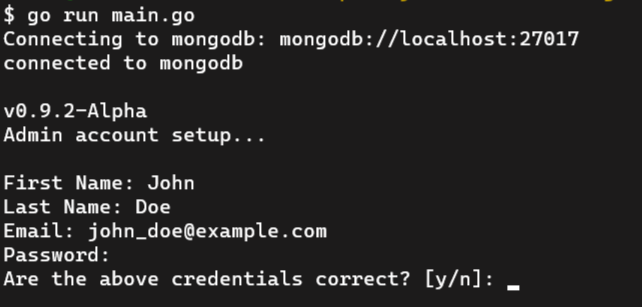
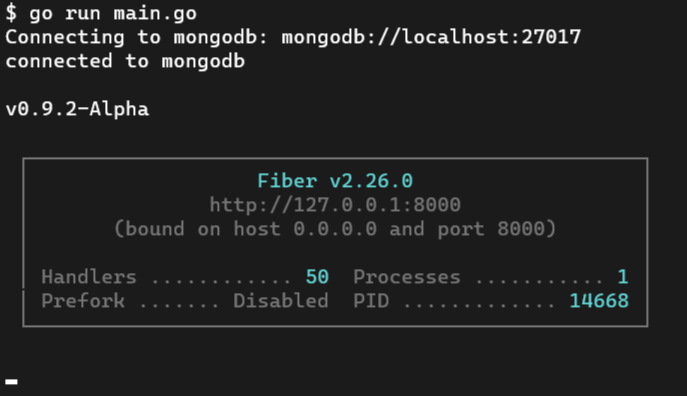
Upon completing the initial setup and creating your default administrator for the system, it is ready to use and this box will appear below, displaying basic system details seen below...


General Functions
-
API Status
Method:
GET<API_URL>/api/v1/statusReturns:
- Status 200:
OK - JSON:
{
    "success": true,
    "message": "the API is active"
}
- Status 200:
Creating Accounts
There are several account that can be registered into the system. As you may guess they are Administrators, Teachers and Students.
-
Creating Administrators
You can create Administrates- who will have permissions to perform majority of the actions in the API. It is common that there are more than one Administrator to help manage the system.
Method:
POST<API_URL>/api/v1/admin/createRequired:
- Logged into an existing Admin account
- JSON:
{
    "firstname": "John",
    "lastname": "Doe",
    "dob": "01-01-1999",
    "email": "john_doe@example.com"
}
Returns:
- Status 200:
OK - JSON:
{
    "success": true,
    "message": "successfully inserted admin"
}
-
Registering a Teacher
Obviously a school management system will require teachers to manage and teach students. Teachers have an important role for the system.
Method:
POST<API_URL>/api/v1/teacher/registerRequired:
- Logged into an existing Admin account
- JSON:
{
    "firstname": "Homer",
    "middlename": "Jay",
    "lastname": "Simson",
    "dob": "12-05-1956",
    "email": "homerdog_simpson@example.com"
}
Returns:
- Status 200:
OK - JSON:
{
    "success": true,
    "message": "successfully inserted teacher"
}
-
Enrolling a Student
What is a school without students? A professional day, but not the point. Students when their application to the school has been accepted by an admin can be enrolled into the school.
Method:
POST<API_URL>/api/v1/student/enrollRequired:
- Logged into an existing Admin account
- JSON:
{
    "firstname": "Bart",
    "middlename": "JoJo",
    "lastname": "Simpson",
    "age": 10,
    "gradelevel": 4,
    "dob": "17-12-1979",
    "province": "...",
    "city": "Springfield",
    "address": "742 Evergreen Terrace",
    "postal": "..."
}
Returns:
- Status 200:
OK - JSON:
{
    "success": true,
    "successfully inserted student"
}
-
Additional Information After creating an account
-
After successfully creating an account for another admin, teacher or student. A school email will be generated for them using their first and last name, each formatted differently based on the type of account.
-
All users are given a random ID used to sign into the system. Each ID is a random 6 digit number.
-
Students are given a random PEN (Personal Education Number). A random 12 digit number.
-
Accounts are given a default profile image. This can be updated in the future.
(Coming Soon) 5. All new users, once have verified their email, will receive and email containing their ID.
(Currently No verified email required) 6. All new users, once have verified their email, will receive and email containing their temporary password.
-
Log Into Accounts
-
Logging into Admin
Method:
POST<API_URL>/api/v1/admin/loginRequired:
- JSON:
{
	"tid": "123456",
	"password": "myawesomepassword123"
}
Returns:
- Status 200:
OK - JSON:
{
	"success": true,
	"message": "correct password"
}
- JSON:
-
Logging into Teacher
Method:
POST<API_URL>/api/v1/teacher/loginRequired:
- JSON:
{
	"tid": "123456",
	"password": "myawesomepassword123"
}
Returns:
- Status 200:
OK - JSON:
{
	"success": true,
	"message": "correct password"
}
- JSON:
-
Logging into Student
Method:
POST<API_URL>/api/v1/student/loginRequired:
- JSON:
{
	"sid": "123456",
	"password": "myawesomepassword123"
}
Returns:
- Status 200:
OK - JSON:
{
	"success": true,
	"message": "correct password"
}
- JSON:
Get Account
-
Get Admin Account
Method:
GET<API_URL>/api/v1/adminRequired:
- Logged into an admin account
Returns:
- Status 200:
OK - JSON:
{
	"success": true,
	"message": "successfully logged into admin",
	"admin:" <admin object>
}
-
Get Teacher Account
Method:
GET<API_URL>/api/v1/teacherRequired:
- Logged into an teacher account
Returns:
- Status 200:
OK - JSON:
{
	"success": true,
	"message": "successfully logged into teacher",
	"teacher:" <teacher object>
}
-
Get Student Account
Method:
GET<API_URL>/api/v1/studentRequired:
- Logged into an admin account
Returns:
- Status 200:
OK - JSON:
{
	"success": true,
	"message": "successfully logged into teacher",
	"student:" <student object>
}
Updating Account Information
-
Update Student Name
Method:
POST<API_URL>/api/v1/student/updateNameRequired:
- Logged into an admin account
- JSON:
{
    "sid": "123456",
    "firstname": "Lisa",
    "middlename": "Marie", // (OPTIONAL)
    "lastname": "Simpson"
}
Returns:
- Status 200:
OK - JSON:
{
	"success": true,
	"message": "successfully updated student"
}
-
Update Student Grade Level
Method:
POST<API_URL>/api/v1/student/updateGradeLevelRequired:
- Logged into an admin account
- JSON":
{
    "sid": "123456",
    "gradelevel": 11
}
Returns:
- Status 200:
OK - JSON:
{
	"success": true,
	"message": "successfully updated student"
}
-
Update Student Homeroom
Method:
POST<API_URL>/api/v1/student/updateHomeroomRequired:
- Logged into an admin account
- JSON:
{
    "sid": "123456",
    "homeroom": "A123"
}
Returns:
- Status 200:
OK - JSON:
{
	"success": true,
	"message": "successfully updated student"
}
-
Update Student Locker
Method:
POST<API_URL>/api/v1/student/updateLockerRequired:
- Logged into an admin account
- JSON:
{
    "sid": "123456",
    "lockernumber": "B123"
}
Returns:
- Status 200:
OK - JSON:
{
	"success": true,
	"message": "successfully updated student"
}
-
Update Student Year of Graduation
Method:
POST<API_URL>/api/v1/student/updateYOGRequired:
- Logged into an admin account
- JSON:
{
    "sid": "123456",
    "yog": 2020
}
Returns:
- Status 200:
OK - JSON:
{
	"success": true,
	"message": "successfully updated student"
}
-
Update Student Password
Method:
POST<API_URL>/api/v1/student/updatePasswordRequired:
- Logged into students account
- JSON:
{
	"password": "myOldPassword",
	"newpassword1": "myNewPassword",
	"newpassword2": "myNewPassword"
}
Returns:
- Status 200:
OK - JSON:
{ "success": true, "message": "successfully updated student password" } - Emails student an alert of password change
-
Update Student Email
Method:
POST<API_URL>/api/v1/student/updateEmailRequired:
- Logged into an admin account or
- Logged into students account
- JSON:
{
	"sid": "123456", // (Only required if signed in as admin)
	"email": "BartSimpsonsCoolEmail@example.com"
}
Returns:
- Status 200:
OK - JSON:
{
	"success": true,
	"message": "successfully updated"
}
-
Update Student Address
Method:
POST<API_URL>/api/v1/student/updateAddressRequired:
- Logged into an admin account
- JSON:
{
   "sid": "123456",
   "address": "742 Evergreen Terrace",
   "city": "Springfield",
   "province": "...",
   "postal": "..."
}
Returns:
- Status 200:
OK - JSON:
{
	"success": true,
	"message": "successfully updated student"
}
-
Update Student Photo
Method:
POST<API_URL>/api/v1/student/updatePhotoRequired:
- Logged into an admin account
- Form Submission:
    sid: "123456"
    image: newStudentPhoto.png
Returns:
- Status 200:
OK - JSON:
{
	"success": true,
	"message": "successfully updated student photo"
}
-
Update Teacher Name
Method:
POST<API_URL>/api/v1/teacher/updateNameRequired:
- Logged into an admin account
- JSON:
{
    "tid": "123456",
    "firstname": "Marjorie",
    "middlename": "Jacqueline", // (Optional)
    "lastname": "Simpson"
}
Returns:
- Status 200:
OK - JSON:
{
	"success": true,
	"message": "successfully updated teacher"
}
-
Update Teacher Homeroom
Method:
POST<API_URL>/api/v1/teacher/updateHomeroomRequired:
- Logged into an admin account
- JSON:
{
    "tid": "123456",
    "homeroom": "A123"
}
Returns:
- Status 200:
OK - JSON:
{
	"success": true,
	"message": "successfully updated teacher"
}
-
Update Teacher Password
Method:
POST<API_URL>/api/v1/teacher/updatePasswordRequired:
- Logged into teacher account
- JSON:
    {
        "password": "myOldPassword",
        "newpassword1": "myNewPassword",
        "newpassword2": "myNewPassword"
    }
Returns:
- Status 200:
OK - JSON:
{ "success": true, "message": "successfully updated teacher password" } - Emails teacher an alert of password change
-
Update Teacher Email
Method:
POST<API_URL>/api/v1/teacher/updateEmailRequired:
- Logged into an admin account or
- Logged into teachers account
- JSON:
{
    "tid": "123456", // (Only required if igned in as admin)
    "email": "MargeSimpson@example.com"
}
Returns:
- Status 200:
OK - JSON:
{
	"success": true,
	"message": "successfully updated teacher"
}
-
Update Teacher Address
Method:
POST<API_URL>/api/v1/teacher/updateAddressRequired:
- Logged into an admin account
- JSON:
{
    "tid": "123456",
    "address": "742 Evergreen Terrace",
    "city": "Springfield",
    "province": "...",
    "postal": "..."
}
Returns:
- Status 200:
OK - JSON:
{
	"success": true,
	"message": "successfully updated teacher"
}
-
Update Teacher Photo
Method:
POST<API_URL>/api/v1/teacher/updatePhotoRequired:
- Logged into an admin
- Form Submission:
    tid: "123456"
    image: newTeacherPhoto.png
Returns:
- Status 200:
OK - JSON:
{
    "success": true,
    "message": "successfully updated teacher photo"
}
-
Update Admin Name
Coming Soon...
-
Update Admin Password
Coming Soon...
-
Update Admin Email
Coming Soon...
-
Update Admin Photo
Coming Soon...
Managing Conacts
To be Documented...
-
Creating Contact
To be Documented...
-
Update Contact Name
To be Documented...
-
Update Contact Address
To be Documented...
-
Update Contact Home Phone
To be Documented...
-
Update Contact Work Phone
To be Documented...
-
Update Contact Email
To be Documented...
-
Update Contact Priority
To be Documented...
-
Delete Conotact
To be Documented...
Remove Users
To be Documented...
-
Remove Admin
To be Documented...
-
Remove Teacher
To be Documented...
-
Remove Student
To be Documented...
Admin Commands
Administrators play a very important role in managing a school, they do much work behind the scenes to make sure that everything is correctly organized and working.
-
Update Locker Combination
To be Documented...
-
Enable Student Account
In the case a students acount has been disabled, an admin would require to enable the account.
To be Documented...
-
Enable Teacher Account
In the case a teachers acount has been disabled, an admin would require to enable the account.
To be Documented...